

Don’t Ask AI to Read a Thousand PDFs. Ask It to Build the Reader.

“HIPAA-Ready” Is Not “HIPAA-Compliant.” Know the Difference.

Chat Thinks. Cowork Works.
Your AI has been a brilliant conversation partner. Ask, answer, ask, answer, and the moment you close the laptop, everything stops. That era is ending. Claude’s Cowork feature is the workhorse half of the tool, and it changes the basic deal: you describe a job, walk away, and come back to finished work.
Here’s how I explain the difference to my AI Essentials Roundtable members. Chat is where you strategize; it’s the thinking partner that knows your business. Cowork is where work gets done without you present. It runs long, multi-step jobs, keeps going after you close your laptop, and lets you peek at progress from your phone. Give it a repeating schedule and it becomes an employee who never forgets a Monday.

The five jobs to hand it
After a few months of daily use, almost everything I delegate falls into five buckets. Morning briefs: a summary of what matters, waiting when you wake. Scheduled recaps: every Friday, the week’s numbers in your inbox. Folder chores: any time files land in a watched folder, something happens to them automatically, like receipts getting digitized into a running spreadsheet. Big batches: a project with many steps that would eat your afternoon. And walk-away work: the job you launch before vacation and check from your phone at the campsite.
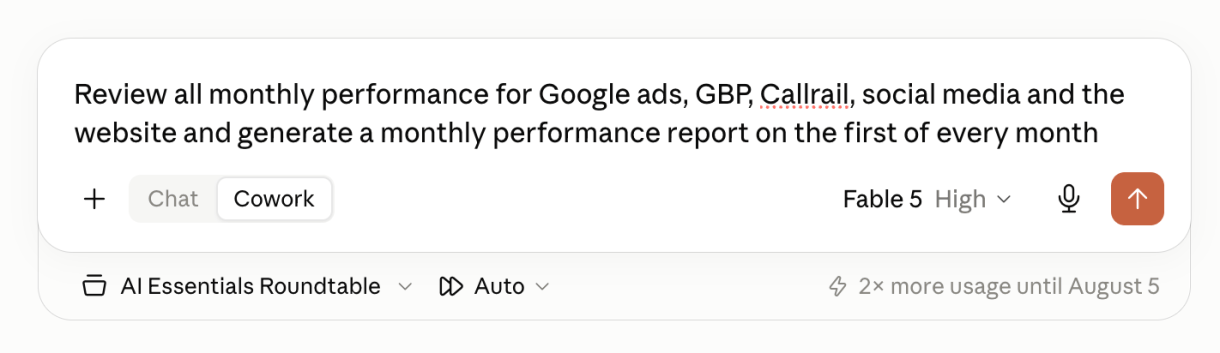
A real one from my own operation: all my monthly reporting files land in one folder automatically. I gave Cowork access and one standing instruction: on the first of every month, read everything in here and generate the monthly performance report. What came back was an agency-grade report, insights and recommended actions included, from a task I described in two sentences.
The pattern that makes it excellent: spawn from chat
Here’s the technique that separates okay results from great ones. Cowork can’t see your past conversations, but your chat can. So when a job needs your voice, your standards, or your business context, don’t write the Cowork prompt yourself. Go to your regular chat and say: I want to create a Cowork task that does X. You know my business and what I care about. Write the prompt for me. Then hand that prompt to Cowork. The strategist briefs the workhorse, and the work comes back sounding like you.
One more insider note on cost: for big jobs, Cowork often builds itself small programs inside your folder and lets those do the heavy lifting, which burns fewer credits than pure conversation would. And scheduled tasks queue politely around your usage limits instead of just dying.
Your first assignment
Don’t start with the ambitious build. Start with the assignment I gave my members this week: tell Cowork to send you a weekly news brief of developments you’d actually care about, every Monday. It takes one sentence, it exercises the whole system, and next Monday you’ll get the small jolt of receiving work you didn’t do. That jolt is the point. It recalibrates what you think this tool is for.
- Decide the job: brief, recap, folder chore, batch, or walk-away work.
- If voice or business context matters: have your regular chat write the Cowork prompt for you.
- Give Cowork access to the one folder it needs. Nothing more.
- Launch it, close the laptop, check progress from your phone.
- Start simple: a weekly Monday news brief you’d actually read.
This post came out of a real conversation at the AI Essentials Roundtable, the small group I run for business owners who want to actually use AI instead of just reading about it. We meet every other week, screen-share real builds, and steal each other’s wins. If that sounds useful, details are here: tablelandpartners.com/ai_essentials_roundtable


